Workflows
Begin with the tasks your team and customers depend on.
INDUSTRY SOLUTIONS · DENTAL PRACTICES
Connected IT for dental practices and DSOs—from practice management and imaging to a cost-conscious Open Dental cloud environment, dependable offices, and secure access between locations.
Request a dental technology assessment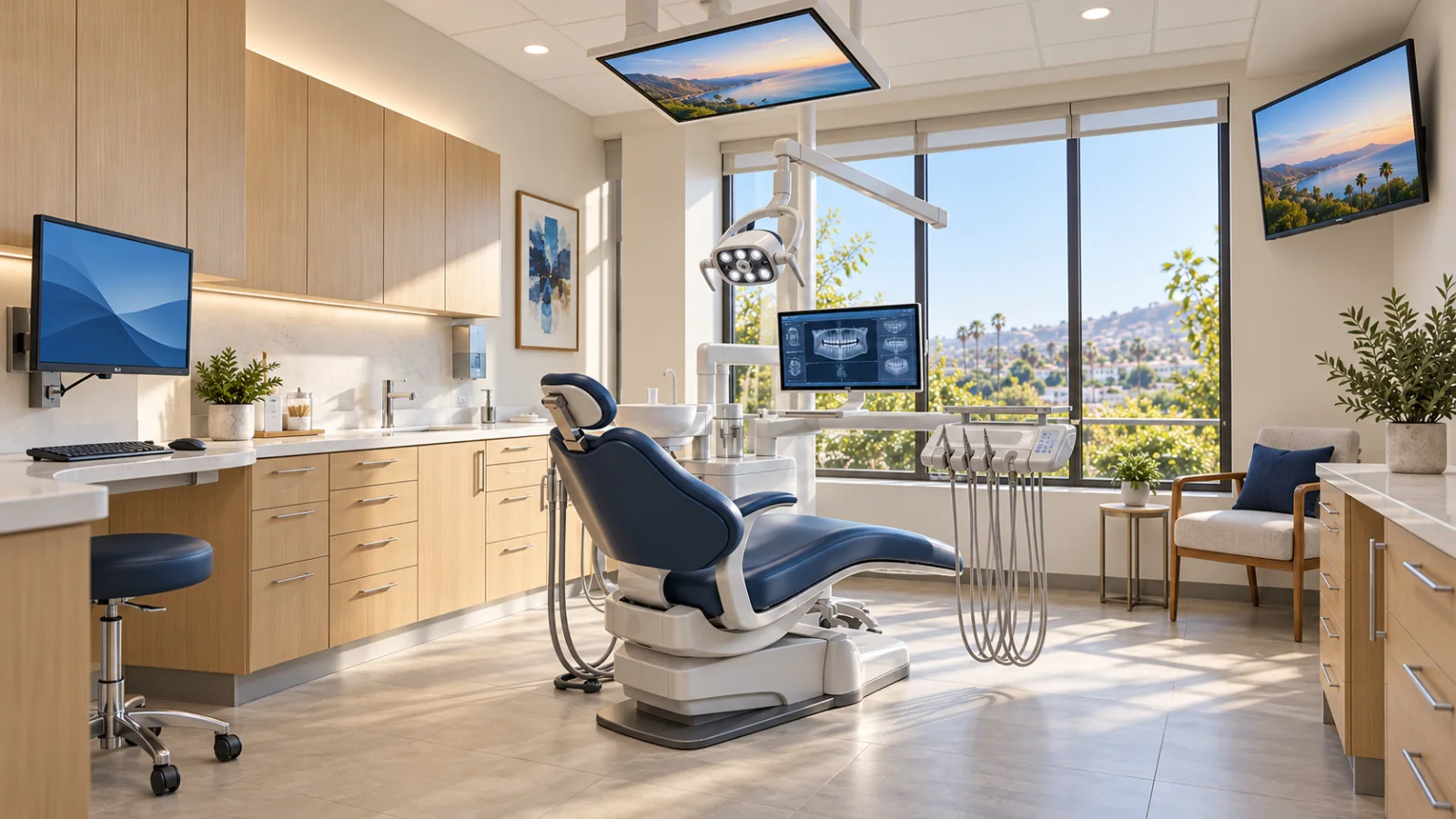
BUILT AROUND YOUR WORK
Connect the everyday experience with the applications, locations and people behind it.
Begin with the tasks your team and customers depend on.
Map the applications, devices and locations involved.
Agree who supports the systems and coordinates changes.
MAKE THE NEXT DECISION CLEARER
Bring clinical systems, workstations, access and vendor responsibilities into one scoped technology discussion.
Start with reception, imaging, treatment rooms and business operations.
Identify where the practice, Network Experts and application or equipment providers need to work together.
Use documented observations and dependencies to discuss improvements, expansion or a controlled recovery test.
DENTAL & HEALTHCARE TECHNOLOGY
Practice management, imaging, and clinical workflows—supported together.
THOUGHTFULLY PLACED TECHNOLOGY
Three display positions, with an optional chair-side screen. Planned around your room, your team and the people in your care.
A wall-mounted computer display for the practice team.
A corner screen for a parent, caregiver or supporter.
A ceiling-mounted display positioned for the patient.
An additional chair-mounted screen when the clinical workflow needs it.
CONNECTED FROM THE FIRST APPOINTMENT
Your day moves from reception to imaging, treatment rooms and back-office operations. We help align the technology and support behind each step.
At reception
Connect scheduling, phones, payments and practice-management access so the front office has a clear path to support.
Scheduling & communicationIn the operatory
Coordinate imaging, sensors and workstations with your software vendors, with changes planned around appointments.
Imaging & clinical workstationsAcross the practice
Bring access, backup and recovery into the same plan, whether you run one practice or manage a growing group.
Security, recovery & growthYour practice team, Network Experts and application providers — with clear responsibilities.
OPEN DENTAL · BUILT FOR GROWING DSOS
Our managed Open Dental cloud implementation brings practices and authorized remote teams into a centrally managed environment. It is designed to control monthly infrastructure costs, with hosting region, connectivity, imaging requirements, and recovery planned around your locations. Compare the complete cost with Open Dental Cloud or Dentrix Ascend and validate real workflow performance before a rollout.
Explore Open Dental cloud for DSOsYOUR EVERYDAY WORK
For independent practice owners, dental service organizations (DSOs), dental groups, office managers, and internal IT teams responsible for the technology behind patient care.
A dental practice depends on connected workflows: appointments, charts, imaging, billing, and communication. A slow workstation, unreliable connection, or poorly coordinated software change can interrupt several teams at once. Technology planning needs to account for the clinical schedule, application requirements, and the realities of each location.
Address the connected path from reception to treatment rooms, with maintenance and escalation arrangements that account for the practice schedule.
Coordinate practice staff, IT support, imaging providers, and software vendors so infrastructure issues reach the right owner.
Build repeatable standards for devices, connectivity, access, and recovery before opening or acquiring another practice.
BUILT AROUND YOUR OPERATIONS
Support the infrastructure and access workflows around Open Dental, Dentrix, Dentrix Ascend, Eaglesoft, and Dolphin. Confirm supported versions, hosting model, licensing, integrations, and each application vendor’s responsibilities before changes.
Coordinate Carestream Dental, Jazz Imaging, Vatech, and Dolphin environments with practice management workflows. Review sensor connectivity, acquisition workstations, image storage, bridges, supported updates, and vendor-approved requirements before changing a clinical workflow.
Design a managed Open Dental environment around multiple offices and authorized remote teams. Centralize operations, evaluate region placement and access methods, and pilot scheduling, billing, imaging, and printing before rollout. Compare the complete monthly scope and measured performance with other cloud PMS options.
Plan supported database and image backups, local Synology recovery where suitable, an independent off-site copy with Axcient, and AWS recovery scenarios where the applications support them. Test application restoration and agree on the recovery sequence with practice staff and vendors.
Review identity, device protection, access removal, administrative privileges, and information-sharing practices. Document agreed technical safeguards and evidence that support the practice’s HIPAA-related program; compliance decisions remain with the organization and its advisers.
Plan new operatories, office moves, practice acquisitions, and equipment refreshes. Coordinate cabling, hardware, software providers, deployment sequencing, and handover so responsibilities are established before opening day.
A COORDINATED APPROACH
Review reception, imaging, clinical, billing, and remote-work processes with the people who use them. Inventory applications, devices, and vendor contacts.
Separate urgent reliability issues from longer-term improvements. Define coverage, maintenance windows, safeguards, recovery expectations, and application-vendor responsibilities.
Pilot changes on representative workstations, coordinate vendor validation, and schedule cutovers with a documented contingency plan.
Confirm the agreed workflows with practice staff, record the environment, and review recurring issues and upcoming growth.
CLIENT REVIEWS
Experiences from the businesses we support, shared on Google.
Reviews appear automatically below.
INDUSTRY QUESTIONS
We review Open Dental, Dentrix, Dentrix Ascend, Eaglesoft, Dolphin, Carestream Dental, Jazz Imaging, and Vatech environments as part of discovery. The engagement confirms versions, licenses, integrations, vendor requirements, and which team owns each support responsibility.
Maintenance windows and communication arrangements can be defined around practice operations. The plan should identify which changes require vendor support, whether the office can keep working, and how the team will verify the clinical workflow before resuming normal use.
No service or technology product alone establishes compliance. IT work can support agreed technical safeguards, documentation, access controls, and recovery procedures. Your practice remains responsible for its broader policies, risk decisions, workforce practices, and any required professional review.
Our managed Open Dental cloud implementation is designed for authorized teams working across locations. We assess application and imaging compatibility, approved access locations, identity safeguards, and internet connectivity. Hosting region and access design are validated through representative workflows; latency varies by location and connection. Review the Open Dental cloud service for the proposed cost and migration approach.
Bring a high-level list of locations, users, key applications, imaging providers, current support arrangements, and the problems you want to solve. Patient records, credentials, and sensitive network configurations should not be submitted through the website.
LET’S TALK ABOUT YOUR BUSINESS
Share the workflows, locations, and changes that matter most to your team.